Obsidian#
• Obsidian is the BEST notes application in the world. Go download it: https://obsidian.md/
The Setup#
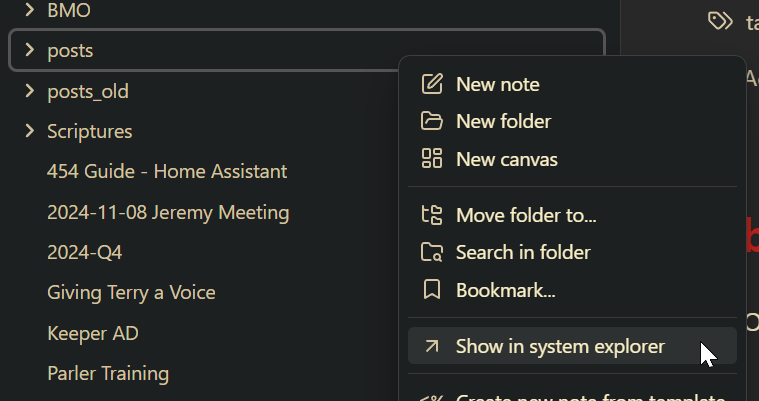
- Create a new folder labeled posts. This is where you will add your blog posts
- …that’s all you have to do
- Actually…wait…find out where your Obsidian directories are. Right click your posts folder and choose show in system explorer You’ll need this directory in upcoming steps.
!
Setting up Hugo#
Install Hugo#
Prerequisites#
Install Hugo#
Link: https://gohugo.io/installation/
Create a new site#
1
2
3
4
5
6
7
|
## Verify Hugo works
hugo version

## Create a new site

hugo new site websitename
cd websitename
|
Download a Hugo Theme#
- Find themes from this link: https://themes.gohugo.io/
- follow the theme instructions on how to download. The BEST option is to install as a git submodule
 1
 2
 3
 4
 5
 6
 7
 8
 9
10
11
12
13
14
|
## Initialize a git repository (Make sure you are in your Hugo website directory)

git init

## Set global username and email parameters for git

git config --global user.name "Your Name"
git config --global user.email "your.email@example.com"


## Install a theme (we are installing the Terminal theme here). Once downloaded it should be in your Hugo themes folder
## Find a theme ---> https://themes.gohugo.io/

git submodule add -f https://github.com/panr/hugo-theme-terminal.git themes/terminal
|
Adjust Hugo settings#
- Most themes you download will have an example configuration you can use. This is usually the best way to make sure Hugo works well and out of the box.
- For the Terminal theme, they gave this example config below.
- We will edit the hugo.toml file to make these changes. —->
nano hugo.toml (Linux/Mac) or notepad hugo.toml (Windows) or code hugo.toml (All platforms)
 1
 2
 3
 4
 5
 6
 7
 8
 9
10
11
12
13
14
15
16
17
18
19
20
21
22
23
24
25
26
27
28
29
30
31
32
33
34
35
36
37
38
39
40
41
42
43
44
45
46
47
48
49
50
51
52
53
54
55
56
57
58
59
60
61
62
63
64
65
66
67
68
69
70
71
72
73
74
75
76
77
78
79
80
81
82
83
84
85
86
87
88
|
baseurl = "/"
languageCode = "en-us"
# Add it only if you keep the theme in the `themes` directory.
# Remove it if you use the theme as a remote Hugo Module.
theme = "terminal"
paginate = 5

[params]
  # dir name of your main content (default is `content/posts`).
  # the list of set content will show up on your index page (baseurl).
  contentTypeName = "posts"

  # if you set this to 0, only submenu trigger will be visible
  showMenuItems = 2

  # show selector to switch language
  showLanguageSelector = false

  # set theme to full screen width
  fullWidthTheme = false

  # center theme with default width
  centerTheme = false

  # if your resource directory contains an image called `cover.(jpg|png|webp)`,
  # then the file will be used as a cover automatically.
  # With this option you don't have to put the `cover` param in a front-matter.
  autoCover = true

  # set post to show the last updated
  # If you use git, you can set `enableGitInfo` to `true` and then post will automatically get the last updated
  showLastUpdated = false

  # Provide a string as a prefix for the last update date. By default, it looks like this: 2020-xx-xx [Updated: 2020-xx-xx] :: Author
  # updatedDatePrefix = "Updated"

  # whether to show a page's estimated reading time
  # readingTime = false # default

  # whether to show a table of contents
  # can be overridden in a page's front-matter
  # Toc = false # default

  # set title for the table of contents
  # can be overridden in a page's front-matter
  # TocTitle = "Table of Contents" # default


[params.twitter]
  # set Twitter handles for Twitter cards
  # see https://developer.twitter.com/en/docs/tweets/optimize-with-cards/guides/getting-started#card-and-content-attribution
  # do not include @
  creator = ""
  site = ""

[languages]
  [languages.en]
    languageName = "English"
    title = "Terminal"

    [languages.en.params]
      subtitle = "A simple, retro theme for Hugo"
      owner = ""
      keywords = ""
      copyright = ""
      menuMore = "Show more"
      readMore = "Read more"
      readOtherPosts = "Read other posts"
      newerPosts = "Newer posts"
      olderPosts = "Older posts"
      missingContentMessage = "Page not found..."
      missingBackButtonLabel = "Back to home page"
      minuteReadingTime = "min read"
      words = "words"

      [languages.en.params.logo]
        logoText = "Terminal"
        logoHomeLink = "/"

      [languages.en.menu]
        [[languages.en.menu.main]]
          identifier = "about"
          name = "About"
          url = "/about"
        [[languages.en.menu.main]]
          identifier = "showcase"
          name = "Showcase"
          url = "/showcase"
|
Test Hugo#
1
2
3
|
## Verify Hugo works with your theme by running this command

hugo server -t themename
|
Walking Through the Steps#
NOTE: There is a MEGA SCRIPT later in this blog that will do everything in one go.
Syncing Obsidian to Hugo#
Windows#
1
|
robocopy sourcepath destination path /mir
|
Mac/Linux#
1
|
rsync -av --delete "sourcepath" "destinationpath"
|
Add some frontmatter#
1
2
3
4
5
6
7
8
|
---
title: blogtitle
date: 2024-11-06
draft: false
tags:
  - tag1
  - tag2
---
|
Transfer Images from Obsidian to Hugo#
Windows#
 1
 2
 3
 4
 5
 6
 7
 8
 9
10
11
12
13
14
15
16
17
18
19
20
21
22
23
24
25
26
27
28
29
30
31
32
33
34
35
36
|
import os
import re
import shutil
# Paths (using raw strings to handle Windows backslashes correctly)
posts_dir = r"C:\Users\chuck\Documents\chuckblog\content\posts"
attachments_dir = r"C:\Users\chuck\Documents\my_second_brain\neotokos\Attachments"
static_images_dir = r"C:\Users\chuck\Documents\chuckblog\static\images"
# Step 1: Process each markdown file in the posts directory
for filename in os.listdir(posts_dir):
if filename.endswith(".md"):
filepath = os.path.join(posts_dir, filename)
with open(filepath, "r", encoding="utf-8") as file:
content = file.read()
# Step 2: Find all image links in the format 
images = re.findall(r'\[\[([^]]*\.png)\]\]', content)
# Step 3: Replace image links and ensure URLs are correctly formatted
for image in images:
# Prepare the Markdown-compatible link with %20 replacing spaces
markdown_image = f"})"
content = content.replace(f"[[{image}]]", markdown_image)
# Step 4: Copy the image to the Hugo static/images directory if it exists
image_source = os.path.join(attachments_dir, image)
if os.path.exists(image_source):
shutil.copy(image_source, static_images_dir)
# Step 5: Write the updated content back to the markdown file
with open(filepath, "w", encoding="utf-8") as file:
file.write(content)
print("Markdown files processed and images copied successfully.")
|
Mac/Linux#
 1
 2
 3
 4
 5
 6
 7
 8
 9
10
11
12
13
14
15
16
17
18
19
20
21
22
23
24
25
26
27
28
29
30
31
32
33
34
35
36
|
import os
import re
import shutil
# Paths
posts_dir = "/Users/networkchuck/Documents/chuckblog/content/posts/"
attachments_dir = "/Users/networkchuck/Documents/neotokos/Attachments/"
static_images_dir = "/Users/networkchuck/Documents/chuckblog/static/images/"
# Step 1: Process each markdown file in the posts directory
for filename in os.listdir(posts_dir):
if filename.endswith(".md"):
filepath = os.path.join(posts_dir, filename)
with open(filepath, "r") as file:
content = file.read()
# Step 2: Find all image links in the format 
images = re.findall(r'\[\[([^]]*\.png)\]\]', content)
# Step 3: Replace image links and ensure URLs are correctly formatted
for image in images:
# Prepare the Markdown-compatible link with %20 replacing spaces
markdown_image = f"})"
content = content.replace(f"[[{image}]]", markdown_image)
# Step 4: Copy the image to the Hugo static/images directory if it exists
image_source = os.path.join(attachments_dir, image)
if os.path.exists(image_source):
shutil.copy(image_source, static_images_dir)
# Step 5: Write the updated content back to the markdown file
with open(filepath, "w") as file:
file.write(content)
print("Markdown files processed and images copied successfully.")
|
Setup GitHub#
- Git yourself an account
- Then create a repo
Authenticate yourself#
1
2
3
|
## Generate an SSH key (Mac/Linux/Windows)

ssh-keygen -t rsa -b 4096 -C "your_email@example.com"
|
Push to GitHub#
1
2
3
4
5
|
# Step 8: Push the public folder to the hostinger branch using subtree split and force push
echo "Deploying to GitHub Hostinger..."
git subtree split --prefix public -b hostinger-deploy # use hostinger to deploy
git push origin hostinger-deploy:hostinger --force
git branch -D hostinger-deploy
|
The Mega Script#
Windows (Powershell)#
  1
  2
  3
  4
  5
  6
  7
  8
  9
 10
 11
 12
 13
 14
 15
 16
 17
 18
 19
 20
 21
 22
 23
 24
 25
 26
 27
 28
 29
 30
 31
 32
 33
 34
 35
 36
 37
 38
 39
 40
 41
 42
 43
 44
 45
 46
 47
 48
 49
 50
 51
 52
 53
 54
 55
 56
 57
 58
 59
 60
 61
 62
 63
 64
 65
 66
 67
 68
 69
 70
 71
 72
 73
 74
 75
 76
 77
 78
 79
 80
 81
 82
 83
 84
 85
 86
 87
 88
 89
 90
 91
 92
 93
 94
 95
 96
 97
 98
 99
100
101
102
103
104
105
106
107
108
109
110
111
112
113
114
115
|
# PowerShell Script for Windows
# Set variables for Obsidian to Hugo copy
$sourcePath = "C:\Users\path\to\obsidian\posts"
$destinationPath = "C:\Users\path\to\hugo\posts"

# Set Github repo
$myrepo = "reponame"

# Set error handling
$ErrorActionPreference = "Stop"
Set-StrictMode -Version Latest

# Change to the script's directory
$ScriptDir = Split-Path -Parent $MyInvocation.MyCommand.Definition
Set-Location $ScriptDir

# Check for required commands
$requiredCommands = @('git', 'hugo')

# Check for Python command
if (Get-Command 'python' -ErrorAction SilentlyContinue) {
    $pythonCommand = 'python'
} elseif (Get-Command 'python3' -ErrorAction SilentlyContinue) {
    $pythonCommand = 'python3'
} else {
    Write-Error "Python is not installed or not in PATH."
    exit 1
}

foreach ($cmd in $requiredCommands) {
    if (-not (Get-Command $cmd -ErrorAction SilentlyContinue)) {
        Write-Error "$cmd is not installed or not in PATH."
        exit 1
    }
}

# Step 1: Check if Git is initialized, and initialize if necessary
if (-not (Test-Path ".git")) {
    Write-Host "Initializing Git repository..."
    git init
    git remote add origin $myrepo
} else {
    Write-Host "Git repository already initialized."
    $remotes = git remote
    if (-not ($remotes -contains 'origin')) {
        Write-Host "Adding remote origin..."
        git remote add origin $myrepo
    }
}

# Step 2: Sync posts from Obsidian to Hugo content folder
Write-Host "Syncing posts from Obsidian..."
if (-not (Test-Path $sourcePath)) {
    Write-Error "Source path does not exist: $sourcePath"
    exit 1
}

if (-not (Test-Path $destinationPath)) {
    Write-Error "Destination path does not exist: $destinationPath"
    exit 1
}

# Use Robocopy to mirror the directories
$robocopyOptions = @('/MIR', '/Z', '/W:5', '/R:3')
$robocopyResult = robocopy $sourcePath $destinationPath @robocopyOptions
if ($LASTEXITCODE -ge 8) {
    Write-Error "Robocopy failed with exit code $LASTEXITCODE"
    exit 1
}

# Step 3: Process Markdown files with Python script to handle image links
Write-Host "Processing image links in Markdown files..."
if (-not (Test-Path "images.py")) {
    Write-Error "Python script images.py not found."
    exit 1
}

# Execute the Python script
try {
    & $pythonCommand images.py
} catch {
    Write-Error "Failed to process image links."
    exit 1
}

# Step 4: Add changes to Git
Write-Host "Staging changes for Git..."
$hasChanges = (git status --porcelain) -ne ""
if (-not $hasChanges) {
    Write-Host "No changes to stage."
} else {
    git add .
}

# Step 5: Commit changes with a dynamic message
$commitMessage = "New Blog Post on $(Get-Date -Format 'yyyy-MM-dd HH:mm:ss')"
$hasStagedChanges = (git diff --cached --name-only) -ne ""
if (-not $hasStagedChanges) {
    Write-Host "No changes to commit."
} else {
    Write-Host "Committing changes..."
    git commit -m "$commitMessage"
}

# Step 6: Push all changes to the main branch
Write-Host "Deploying to GitHub..."
try {
    git push origin main
} catch {
    Write-Error "Failed to push to main branch."
    exit 1
}

Write-Host "All done! Site synced, processed, committed, and pushed to GitHub."
Write-Host "Cloudflare Pages will automatically deploy your site."
|
Linux/Mac (BASH)#
 1
 2
 3
 4
 5
 6
 7
 8
 9
10
11
12
13
14
15
16
17
18
19
20
21
22
23
24
25
26
27
28
29
30
31
32
33
34
35
36
37
38
39
40
41
42
43
44
45
46
47
48
49
50
51
52
53
54
55
56
57
58
59
60
61
62
63
64
65
66
67
68
69
70
71
72
73
74
75
76
77
78
79
80
81
82
83
84
85
86
87
88
89
90
91
|
#!/bin/bash

# Set variables for Obsidian to Hugo copy
SOURCE_PATH="/Users/path/to/obsidian/posts"
DESTINATION_PATH="/Users/path/to/hugo/posts"

# Set Github repo
MYREPO="reponame"

# Set error handling
set -e

# Check for required commands
for cmd in git hugo; do
    if ! command -v $cmd &> /dev/null; then
        echo "$cmd is not installed or not in PATH."
        exit 1
    fi
done

# Check for Python command
if command -v python &> /dev/null; then
    PYTHON_CMD="python"
elif command -v python3 &> /dev/null; then
    PYTHON_CMD="python3"
else
    echo "Python is not installed or not in PATH."
    exit 1
fi

# Step 1: Check if Git is initialized, and initialize if necessary
if [ ! -d ".git" ]; then
    echo "Initializing Git repository..."
    git init
    git remote add origin $MYREPO
else
    echo "Git repository already initialized."
    if ! git remote | grep -q "origin"; then
        echo "Adding remote origin..."
        git remote add origin $MYREPO
    fi
fi

# Step 2: Sync posts from Obsidian to Hugo content folder
echo "Syncing posts from Obsidian..."
if [ ! -d "$SOURCE_PATH" ]; then
    echo "Source path does not exist: $SOURCE_PATH"
    exit 1
fi

if [ ! -d "$DESTINATION_PATH" ]; then
    echo "Destination path does not exist: $DESTINATION_PATH"
    exit 1
fi

# Use rsync to mirror the directories
rsync -av --delete "$SOURCE_PATH/" "$DESTINATION_PATH/"

# Step 3: Process Markdown files with Python script to handle image links
echo "Processing image links in Markdown files..."
if [ ! -f "images.py" ]; then
    echo "Python script images.py not found."
    exit 1
fi

# Execute the Python script
$PYTHON_CMD images.py

# Step 4: Add changes to Git
echo "Staging changes for Git..."
if [ -z "$(git status --porcelain)" ]; then
    echo "No changes to stage."
else
    git add .
fi

# Step 5: Commit changes with a dynamic message
COMMIT_MESSAGE="New Blog Post on $(date '+%Y-%m-%d %H:%M:%S')"
if [ -z "$(git diff --cached --name-only)" ]; then
    echo "No changes to commit."
else
    echo "Committing changes..."
    git commit -m "$COMMIT_MESSAGE"
fi

# Step 6: Push all changes to the main branch
echo "Deploying to GitHub..."
git push origin main

echo "All done! Site synced, processed, committed, and pushed to GitHub."
echo "Cloudflare Pages will automatically deploy your site."
|